νεναη

νεναη

Facebook

Android M: The Next Generation of Lollipop

In June, 2014 Google, the Mountain View based inventor and search giant launched Android Lollipop, the most talked Operating System till date, during Google I/O inMoscone Centre, San Francisco. In2012I/O meet, Google launched Android Jelly Bean and this year, in theirwhat’s New in Androidsegment the company is going to launch their newest and upcomingAndroid M.
The wordMmay refer to Marshmallow, Milky Bar or, Muffin. The name is not yet announced and expectedly, the day won’t be tomorrow as in previous year, Google initially used the nameAndroid Land later on named it Lollipop. So, here we may have to wait a bit to get final confirmation on the name of the latest Android. But, apart from the name, a slight preview can be forwarded onwhat Android M is going to bring in this smart tech world.

*.Android for work:In the month of February, Google has launched a perfect program – Android for all kind of work purposes and named it Android for Work. To make it work on reality Google associated with several big brands for partnering in various aspects to fulfill the project. Google is still working to roll out android apps for business and expectedly with this update, we will be able to see some progress in the Android for Work project.*.Voice Command:

Expectedly with the latest update new changes will be found in Voice command. Just think, what is next of ‘OK Google’.*.More Gesture:TheChop Chopgesture which has arrived withAndroid 5.1and has become popular very soon, can be followed by many more apart from on screen finger movement. On hand device movement make things easier, no doubt, as chopping open flash light in Moto X.*.More Apps:Sometimes I think the mobile world is running for apps and lough by myself. But, in a serious note, sources claim that, this tech hunter is going update android with special ability to access more apps without downloading them. That means, more free space and smooth surfing.*.More Battery Life:Smartphone dependency is growing in daily life. Google, which has experimented to makelife simple will expectedly improve battery back in the most popular and largely used operating system.*.Security:If the assumption of all work development goes right, then Google have to strengthen smartphone security for better and safe on mobile work. It has already launched touch sensor to unlock the mobile and expectedly will apply similar features to open individual app or icons to protect mobile data.Apart from the mentioned functional improvements, few small changes can be added. But, expecting a huge difference through this update may not act out in reality. These assumptions have been made on the basis of Android’s few latest changes. It is quite clear that, the new changes are merely a glimpse of entire story. Assumingly the rest is going to arrive with Android M. 

iPhone 6s Vs Sony Xperia Z3

Iphone 6s Vs Xperia Z3
Image Name: Pásense por el post (link en los comentarios) y opinen cual es el ...File Size: 1035 x 1035 pixels (189962 bytes)
Image Name: Apple iPhone 6 vs Sony Xperia Z3: in-depth specs comparisonFile Size: 220 x 220 pixels (54783 bytes)


Image Name: Sony Xperia Z3 vs Xperia Z5, ilk bakışFile Size: 646 x 646 pixels (36421 bytes)
Image Name: Both the Sony Xperia Z3 and the Apple iPhone 6 are for sure some of ...File Size: 1000 x 1000 pixels (55254 bytes)
Image Name: iPhone 6S Plus: scheda tecnica e caratteristiche ufficiali| TecnocinoFile Size: 625 x 625 pixels (41788 bytes)
Image Name: iPhone 6s vs. Sony Xperia Z5: Κόντρα στα τεχνικά ...File Size: 570 x 570 pixels (184359 bytes)

Image Name: iPhone 6 vs Sony Xperia Z3File Size: 1280 x 1280 pixels (659435 bytes)
Image Name: Video stabilizzatore Sony Xperia Z5 vs Z3: ecco perchè il Premium non ...File Size: 630 x 630 pixels (65295 bytes)iPhone 6 vs Xperia Z3 Compact Review: Sony The iPhone SlayerSony's Xperia Z3 Compact is ready to take on Apple's iPhone 6. The latest iPhones have captured the hearts and minds of the Apple faithful, .... iPhone 6S vs. Samsung Galaxy S5 vs. Sony Xperia Z3 ...: Phones iPhone 6S vs. Samsung Galaxy S5 vs. Sony Xperia Z3 – Pricing and Specifications Compared.Apple iPhone 6 vs Sony Xperia Z3 - Phone Arena - Phone ...:Apple iPhone 6 vs Sony Xperia Z3; Apple iPhone 6 vs Sony Xperia Z3. ... Amount of RAM in the Apple iPhone 6s,... Sony Xperia Z5 hands-on: .... iPhone 6 vs Sony Xperia Z3 comparison- Macworld UK: iPhone 6 vs Sony Xperia Z3 comparison: design and build. The Xperia Z3 utilises the classic styling of an Xperia smartphone: square shape, side mounted buttons and ....Sony Xperia Z3 vs. iPhone 6: Specs, Features, Price:Sony Xperia Z3 vs. iPhone 6: Specs, Features, Price. 0. Tweet. Sign Up for Free eNewsletter .... Phone Comparison: Sony Xperia Z3 vs Apple iPhone 6 Plus ...: ... but little seen Sony Xperia Z3 versus the venerable Apple iPhone 6. Sony makes a me. ... but little seen Sony Xperia Z3 versus the venerable Apple iPhone 6.. iPhone 6S vs. Samsung Galaxy S5 vs. Sony Xperia Z3...: As we enter into 2015, some of the best smartphones are from companies like Samsung, Sony, and Apple. Samsung’s Galaxy S5 and the Sony Xperia Z3 have captured ....iPhone 6 vs. Sony Xperia Z3 - Review (4K) - YouTube:Apple iPhone 6 vs. Sony Xperia Z3!. Apple iPhone 6 vs Sony Xperia Z3 - Mobile Phones Specs ...: Top 33 Reasons for the Apple iPhone 6 vs. Sony Xperia Z3 ... iPhone 6s Plus vs Galaxy Note 5 iPhone 6s vs Galaxy S6 Xperia Z5 Premium vs iPhone 6s Plus iPhone 6 vs ....iPhone 6 and iPhone 6 Plus vs Sony Xperia Z3: Smartphone ...:iPhone 6 and iPhone 6 Plus vs Sony Xperia Z3: Smartphone specs compared. ... The Xperia range prides itself in beingthe first major flagship to feature full ...
Image Name: ... Xperia Z5 в одно время с релизом iPhone 6sFile Size: 580 x 580 pixels (36363 bytes)
Image Name: Apple iPhone 6s vs Samsung Galaxy S6 vs Sony Xperia Z5: Specs faceoff ...File Size: 638 x 638 pixels (14641 bytes)Related Keyword:Pásense por el post (link en los comentarios) y opinen cual es el ..., Apple iPhone 6 vs Sony Xperia Z3: in-depth specs comparison,Sony Xperia Z3 vs Xperia Z5, ilk bakış, Both the Sony Xperia Z3 and the Apple iPhone 6 are for sure some of ...,iPhone 6S Plus: scheda tecnica e caratteristiche ufficiali | Tecnocino,iPhone 6s vs. Sony Xperia Z5: Κόντρα στα τεχνικά ..., iPhone 6 vs Sony Xperia Z3,Video stabilizzatore Sony Xperia Z5 vs Z3: ecco perchè il Premium non ..., ...Xperia Z5 в одно время с релизом iPhone 6s,Apple iPhone 6s vs Samsung Galaxy S6 vs Sony Xperia Z5: Specs faceoff ....

Sony Xperia Z6 Reviews

Xperia Z6 Specs and FeaturesXperia Z6 is future flagship from Sony and the successor of Xperia Z5. As the Xperia Z5 flagship has been unveiled recentlyand Sony scheduled to release new smartphone in Xperia Z series every six months, it is not too early to start discussion about the Xperia Z6 flagship. According to six months cycle, Sony may unveil Xperia Z6 in MWC 2016 in March 2016. Otherwise the Japanese tech giant may bring it early in February.Sony Xperia Z6 may feature 5.5 inches IPS Triluminos display with 4K Resolution.As Xperia Z5 Premiun features 4K Resolution,obviously Z6 also features 4K Resolution. Corning Gorilla Glass 4 will be used as Display protection for Z6. The Z6flagship will be powered by Qualcomm Snapdragon 820 Chipset.Some details about Snapdragon 820 has been announced by Qualcomm recently.According to them, Xperia Z6 flagship can process 4K videos at 60fps and 30fps wirelessly. Snapdragon 820 SoC may contain 4 Custom Kryo Cores clocked at 3.0 Ghz. Snapdragon 820 also supports LTE-Uband of 4G along with 3G and 2G. So users can get download speeds upto 600MBPS and upload speeds upto 150MBPS. Adreno 530 GPU is also coming with SD 820 which is 40% more efficient than predecessor. As Snapdragon 820 is being built on 14nm Process, there will be no more over heating problem and consumes little battery juice. Xperia Z6 may boastRAM upto 4GB.

Sony may use 30 MP Rear Camera with Dual LED flash in Xperia Z6. It may also feature 4K video recording at 60fps with HDR support. Sony may use IMX2xx sensor in Xperia Z6 to reduce noise and increase color quality. Optical Image Optimization and HDR are some features of Rear Camera of Xperia Z6. Sony may improve Autofocus of Xperia Z6 to make better than Xperia Z5. The Japanese tech giant may use 8MP Rear Camera in Xperia Z6 for better selfies and high quality videos.Sony may use Non-removable 4000 mAh Li-Po battery in XperiaZ6 to give better backup and standby time. It also supports Quick Charge 3.0 which charges upto 85% in just 35 mins. It also comes with pre-loaded Android 6.0 Marshmallow operating system. It also features Fingerprint sensor on rear side like upcoming Google Nexus or in Home button like Galaxy S6. Fingerprint sensor may also present on side Frame like Xperia Z5. Sony Z6 may also feature front facing speakers. Sony will use USB Type-C port in Xperia Z6 for super fast charging and faster data transfer. The future flagship from Sony will be fully waterproof and dustproof also.Xperia Z6 Release date and PriceAccording to the usual 6 months schedule, Sony will launch Xperia Z6 flagship in MWC 2016 which takes place in first week of March 2016. So the flagship will be released into the Market by the end of March and in April in some regions. Sony may also go for an early launch of Z6 in February also. So we have to wait a few days to know the launch date of the next flagship accurately. The 32 GB internal memory variant of Xperia Z6 may be available in the range of $700-800

Rajesh Sunuwar 

Sony Xperia Z5

IntroductionWith the Xperia Z5 family, Sony has definitely piqued the interest of the public, delivering not one, but three flagship devices. The Z5 Premium is the world first 4K screen phone, while the Xperia Z5 compact is a powerhouse device with a small footprint.This, however, puts the regular Z5 in somewhat of an odd spot. For the first time ever, the standard "Z" model is not the "latest and greatest" Sony has to offer. It also almost identical to the Z3+, while being quite a bit more expensive.But reading the specs on paper really doesn't reveal the extent in which To really see the Z5 for what it is and understand all the work Sony has put into making it a familiar, yet refined device, we have to dig deeper. That is just what we intend to do in the following pages - to see just how different the Z5 is from the Z3+, what has changed and what has been preserved. To discover if the Z5 is Sony's flagship savior, or just a fixed-up Z3+, bound to stay underappreciated amidst its superstar siblings.Key features5.2" 16M-color 1080 x 1920 IPS LCD capacitive touchscreen with X Reality for Mobile, Triluminos technology and Dynamic Contrast Enhancer; scratch-resistant glass, oleophobic coatingAndroid OS v5.1.1 Lollipop with Xperia launcherOcta-core Qualcomm MSM8994 Snapdragon 810, feat. a quad-core 1.5 GHz Cortex-A53 and quad-core 2 GHz Cortex-A57and an Adreno 430 GPU and 3GB RAM23 MP camera with 2160p@30fps video recording; 5.1 MP front-facing camera with 1080p@30fps video32GB of built-in storage and a microSD card slotLTE Cat.4 (150Mbps)/Cat.6 (300Mbps), depending on the region; Dual-band Wi-Fi a/b/g/n/ac; A-GPS/GLONASS receiver, Bluetooth v4.1, FM radio with RDSActive noise cancellation with a dedicated mic2,900mAh non-removable batteryIP68 certified - dust and water proof up to 1.5 meter and 30 minutesFingerprint sensorMain disadvantagesScreen bezels are wider than the Xperia Z3+Non-removable batteryHeavier and thicker than the Xperia Z3+It is quite obvious that specs-wise the Sony Xperia Z5 does not disappoint. The handset is powered by Qualcomm's top-of-the-line Qualcomm MSM8994 Snapdragon 810 chip, along with an Adreno 430 GPU, 3GB of RAM and 32GB of onboard storage. That also happens to be the case with the Z3+. Similarities extend even furtherto the 5.2-inch FullHD display that also seems to be shared between the two models. In fact, the only significant hardware differences between the pair are the fingerprint reader and the camera.Sony is betting big on its new multi-aspect 23MP sensor, which is being marketed as the Z5's major feature. However, the same shooter is actually present in the Z5 Compact and Z5 Premium as well, so it is not quite as exclusive to the model as Sony would have you believe. It's nonetheless an excellent camera and we can't wait to put it to use.But let's not get ahead of ourselves. The most important thing is thatthe Z5 Compact promises to learn from the Z3+ and its mistakes and excel where it failed. That's alone is enough to warrant a full length review. So jump on.

Editing by Rajesh Sunuwar

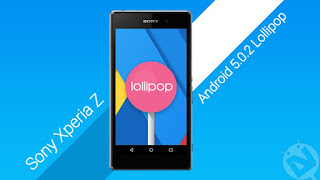
Manually Install Official Android 5.0.2 Lollipop Firmware on Sony Xperia Z

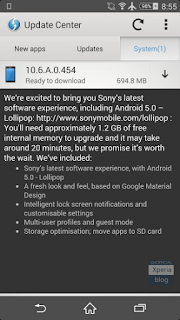
Sony Mobiles has finally started rolling out the Android 5.0.2 Lollipop update to the older
Xperia Z series smartphones. The update comes with the firmware build 10.6.A.0.454 and
brings the device to the Android 5.0.2 Lollipop. Currently, the update is available via the OTA
update and PC Companion. The users in USA, Hong Kong, Taiwan, Bangladesh can try their
luck by checking for the OTA update in the system settings.

The Lollipop update for the C6602 and C6603 devices brings a lot of features to the old Xperia
Z devices and here are a few of them:
A fresh look based on Google’s Material Design.
Intelligent Lockscreen notifications and customizable settings.
Multi-user profile and guest mode.
Storage optimizations and move apps to SDcard.
Those who can’t wait for the official OTA notification to popup on their device, you can grab
the FTF firmware packages by XDA member Haminjuri form below and flash them manually
using the Sony flash tool.
Firmware Downloads
For C6602 users: C6602_10.6.A.0.454_Customized_US.ftf
For C6603 users: C6603_10.6.A.0.454_Customized_HK.ftf | Mirror (thanks to Agred )
Warning
This Guide is intended only for the Xperia Z devices not for any other device of Sony. You alone
are responsible for any consequences that might occur during the process. DroidViews or any
of its community members shall not be held responsible for any damage to your device.
Prerequisites
Charge your Xperia Z above 60% battery level to avoid shutdowns during the process.
Enable USB Debugging: Link
Install proper drivers for your Xperia Z on your PC. You can download the Sony drivers from
here.
Backup your device storage, Contacts, SMS etc. using Google Sync service or any third-
party app.

Manually Flash Android 5.0.2 Lollipop Firmware
on Sony Xperia Z
1. Download the Sony FTF flash tool and install it on your PC → Click Here
2. Download the required firmware file from above links and paste the FTF file in the C:/
Flashtool/firmwares directory.
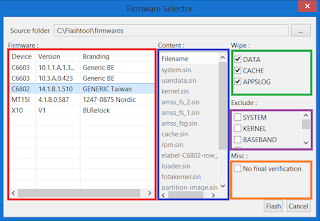
3. Now open the Flash Tool and select the FTF package you want to install on your Sony Xperia
Z.
4. Click on the Flash button at the lower right corner of the tool.
5. You’ll get a prompt asking you to go to Flashmode or Fastboot mode , choose Flashmode.
6. You should see the screen similar to this before flashing (You’ll see the device name and
firmware version according to your device):
7. Make sure you’ve selected all the 3 options in the Wipe menu of the Flash tool and skip No
final verification at the bottom.
8. Now click on the Flash button to flash the FTF file on your device.
9. The tool asks you to connect the device in the flash mode. To boot to the flash
mode, connect your powered off device to the PC while holding volume down button.
10. Once the device is detected, the firmware will be flashed. Wait for the process to complete
and then reboot.

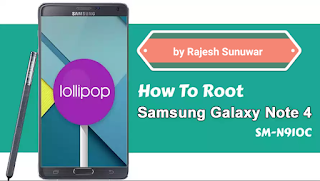
How to root Galaxy Note 4 N910C on Android 5.1.1 Lollipop

https://youtu.be/MgvikmcNBbQ

How to root Galaxy Note 4 N910C on Android 5.1.1 Lollipop
By Rajesh Sunuwar
September 2, 2015 13:32 BST
If you have updated your unlocked Galaxy Note 4 with Android 5.1.1 OTA update (N910CXXU1COH4) that Samsung rolled out for users in Poland, and are currently looking for a root method, you might consider using the root package by senior XDA forum member, geiti94. But to use this root, ensure that your phone has Android 5.0.1 bootloader, otherwise you will encounter infinite bootloops. Also, keep in mind this root removes Knox security, installs SuperSU, Buxybox and 5.0.1 modem.
The member further warns users not to use this root package as it installs 5.0.1 modem for Note 4 N910C model. Also, before jumping directly to the root method , ensure that your phone meets the following requirements.
Pre-requisites
Ensure that your Note 4 is having at least 60% battery.
Enable USB debugging mode. Go to Settings>> About>> Build number and tap on it seven times to unlock the Developer options. Return to Settings>> Developer options and click USB debugging .
Install appropriate Samsung USB drivers on your PC.
Install TWRP recovery on the phone.
Create a nandroid backup of all data of your phone.
Why advertise with us
How to root Galaxy Note 4 on Android 5.1.1
Step-1: Download the flashable root package and transfer it to the storage of the phone
Step-2: Download Android 5.0.1 bootloader package . Extract it using any extracting tool and you should find a folder containing Odin flashable tar package and Odin binaries
Why advertise with us
Step-3: Put your Note 4 into Download mode
For this, first switch it off
Press the Volume Down, power and Home buttons together until a warning screen appears with an Android logo
Press Volume Up button to confirm entering into Download mode
Step-4: Connect your phone with the PC via USB cable
Step-5: Double click Odin3 v3.09.exe file to open it
Step-6: Flash the bootloader. Click BL button in Odin and load the bootloader file and click Start
Why advertise with us
Step-7: When the installation is completed, reboot the phone into recovery mode
Switch off the phone
Press and hold Volume Up, Power and Home buttons together until the Samsung logo appears, then release the Power button while holding the other two until the recovery menu appears
Step-8: In recovery mode, select Install and locate the root package which you have saved in the phone's storage
Step-9: Upon installation of the root package, reboot the phone
Hit the development thread over XDA if you come across any issue with the root.
More about Galaxy Note 4
Samsung releases Android 5.1.1 OTA update for Galaxy Note 4 SM-N910C
Galaxy Note5 manages to meet most of Note 4's battery standards
Android 5.0.1 Lollipop N910CXXU1BOC3 rolling out for Galaxy Note 4 (Exynos 5433) in various countries
New Android 5.0.1 N910FXXU1BOC3 official build for Galaxy Note 4 bundles lots of goodies [How to install]

Required Files:

Download Flashable Root Package
Download Android 5.0.1 Bootloader Package

FxGuru app iPhone and Android Free Download

                  iPhone and Android free                                      Download FxGuru 


 iPhone FxGuru app
iPhone FxGuru app
                

Fxguru effect Unlock Hack app
Android FxGuru app 


Editing by Rajesh Sunuwar 
https://youtu.be/iOWuziNCiQ4
Fxguru effect Unlock Hack app


Watching Video

How to root Galaxy Note 4 N910C on Android 5.1.1 Lollipop

How to root Galaxy Note 4 N910C on Android 5.1.1 Lollipop
By Rajesh Sunuwar
September 2, 2015 13:32 BST
If you have updated your unlocked Galaxy Note 4 with Android 5.1.1 OTA update (N910CXXU1COH4) that Samsung rolled out for users in Poland, and are currently looking for a root method, you might consider using the root package by senior XDA forum member, geiti94. But to use this root, ensure that your phone has Android 5.0.1 bootloader, otherwise you will encounter infinite bootloops. Also, keep in mind this root removes Knox security, installs SuperSU, Buxybox and 5.0.1 modem.
The member further warns users not to use this root package as it installs 5.0.1 modem for Note 4 N910C model. Also, before jumping directly to the root method , ensure that your phone meets the following requirements.
Pre-requisites
Ensure that your Note 4 is having at least 60% battery.
Enable USB debugging mode. Go to Settings>> About>> Build number and tap on it seven times to unlock the Developer options. Return to Settings>> Developer options and click USB debugging .
Install appropriate Samsung USB drivers on your PC.
Install TWRP recovery on the phone.
Create a nandroid backup of all data of your phone.
Why advertise with us
How to root Galaxy Note 4 on Android 5.1.1
Step-1: Download the flashable root package and transfer it to the storage of the phone
Step-2: Download Android 5.0.1 bootloader package . Extract it using any extracting tool and you should find a folder containing Odin flashable tar package and Odin binaries
Why advertise with us
Step-3: Put your Note 4 into Download mode
For this, first switch it off
Press the Volume Down, power and Home buttons together until a warning screen appears with an Android logo
Press Volume Up button to confirm entering into Download mode
Step-4: Connect your phone with the PC via USB cable
Step-5: Double click Odin3 v3.09.exe file to open it
Step-6: Flash the bootloader. Click BL button in Odin and load the bootloader file and click Start
Why advertise with us
Step-7: When the installation is completed, reboot the phone into recovery mode
Switch off the phone
Press and hold Volume Up, Power and Home buttons together until the Samsung logo appears, then release the Power button while holding the other two until the recovery menu appears
Step-8: In recovery mode, select Install and locate the root package which you have saved in the phone's storage
Step-9: Upon installation of the root package, reboot the phone
Hit the development thread over XDA if you come across any issue with the root.
More about Galaxy Note 4
Samsung releases Android 5.1.1 OTA update for Galaxy Note 4 SM-N910C
Galaxy Note5 manages to meet most of Note 4's battery standards
Android 5.0.1 Lollipop N910CXXU1BOC3 rolling out for Galaxy Note 4 (Exynos 5433) in various countries
New Android 5.0.1 N910FXXU1BOC3 official build for Galaxy Note 4 bundles lots of goodies [How to install]


Editing by Rajesh Sunuwar 

Samsung Galaxy Note 4 (Lollipop 5.1.1 Update)

Galaxy S5 Android 5.1.1 Lollipop Update Hits The U.S.
About The Author
Sam Nemyra
 Home / Uncategorized / Galaxy S5 Android 5.1.1 Lollipop Update Hits The U.S.
 Sam Nemyra |  June 23, 2015 |  Uncategorized |  No Comments
In an astonish turn of occasions, the Samsung Galaxy S5 started getting the absolute most
recent Android 5.1.1 Lollipop software new update in the United States. Last week we heard
different reports that it was coming soon for the global Galaxy S5, under the phase of testing,
and most were not expecting United States carriers to deliver this latest update for at least one
more month.
But, this morning several reports have confirmed the Galaxy S5 in the US is receiving Android
5.1.1 Lollipops. Now all the updates and news have been aimed at the latest Galaxy S6 Edge
and Samsung Galaxy S6, however, today T-Mobile begun pushing 5.1.1 for the Galaxy S5 from
a previous year.
In the month of April, Google corroborated a summarize to its Android 5.1 update. That being a
little Android 5.1.1 Lollipop release goal fixing a few bugs and get better on the initial release.

volume Down + home button + power button
How to Samsung Galaxy Unlock playlist ► https://m.youtube.com/watch...
Samsung Galaxy Note 4 Lollipop 5.1.1
http://www.ibtimes.co.uk/ho...
Live firmware update feed:-
For SM-N910C (Exynos): http://live.samsung-updates...
For SM-N910F (Snapdragon): http://live.samsung-updates...


Other live firmware update sites: http://samsung.youmobile.org/

The new update has been accessible on Nexus devices for numerous weeks currently, and it’s
gradually starting to reach for non-Nexus devices.
In the United States the first Android 5.1.1 Lollipop update for a device of Samsung came with
T-Mobile also, which was a astonish in itself, and currently several are even more amazed it’s
hitting the older Galaxy S5.
Samsung first to roll out Android 5.1.1 for its smartphones of Galaxy and prior this month, the
company shoved out an update of Android 5.1.1 for the Galaxy S6 Edge and Galaxy S6 on T-
Mobile in the US, however so far that’s the just United States carrier to release the latest
software of Google. We were waiting Verizon, AT&T and others to be up next, and bring
Android 5.1.1 for the Galaxy S6, however regardless it’s T-Mobile once more, however
delivering it for the Galaxy S5.
T-Mobile have corroborated or still announced the update,

νεναη δσησωσχ


M


I


Sunuwar © 2012 | Designed by Rumah Dijual, in collaboration with Buy Dofollow Links! =) , Lastminutes and Ambien Side Effects